Data with Bert logo

Why Parameter Sniffing Isn't Always A Bad Thing (But Usually Is)

05b48-1w4tmpnro22csahycrb9iug.jpeg

In this series I explore scenarios that hurt SQL Server performance and show you how to avoid them. Pulled from my collection of "things I didn't know I was doing wrong for years."

Watch this week's video on YouTube

Last week we discussed how implicit conversions could be one reason why your meticulously designed indexes aren't getting used.

Today let's look at another reason: parameter sniffing.

Here's the key: Parameter sniffing isn't always a bad thing.

Most of the time it's good: it means SQL Server is caching and reusing query plans to make your queries run faster.

Parameter sniffing only becomes a problem when the cached plan isn't anywhere close to being the optimal plan for given input parameters.

So what's parameter sniffing?

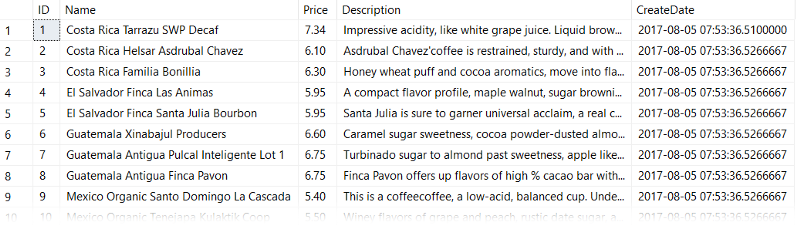
Let's start with our table dbo.CoffeeInventory which you can grab from Github.
4dedb-17uyfuaa5zzf_h5civ9ww4w

The key things to know about this table are that:

  1. We have a nonclustered index on our Name column.
  2. The data is not distributed evenly (we'll see this in a minute)

Now, let's write a stored procedure that will return a filtered list of coffees in our table, based on the country. Since there is no specific Country column, we'll write it so it filters on the Name column:

DROP PROCEDURE IF EXISTS dbo.FilterCoffee
GO
CREATE PROCEDURE dbo.FilterCoffee
@ParmCountry varchar(30)
AS
BEGIN
    SELECT Name, Price, Description 
    FROM Sandbox.dbo.CoffeeInventory
    WHERE Name LIKE @ParmCountry + '%'
END
GO

Let's take a look at parameter sniffing in action, then we'll take a look at why it happens and how to solve it.

EXEC dbo.FilterCoffee @ParmCountry = 'Costa Rica'
EXEC dbo.FilterCoffee @ParmCountry = 'Ethiopia'

Running the above statement gives us identical execution plans using table scans:
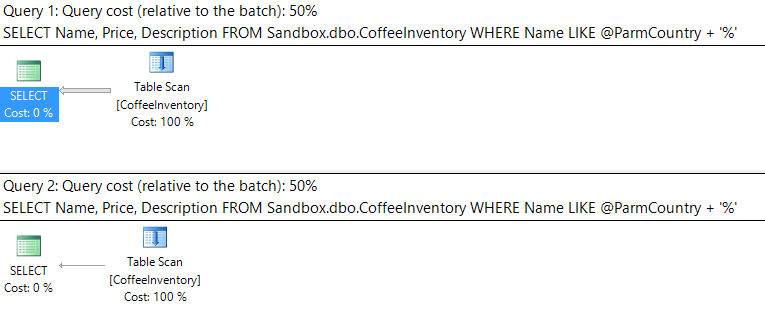
In this case we explicitly specified the parameter @ParmCountry. Sometimes SQL will parameterize simple queries on its own.

That's weird. We have two query executions, they are using the same plan, and neither plan is using our nonclustered index on Name!

Let's step back and try again. First, clear the query plan cache for this stored procedure:

DECLARE @cache_plan_handle varbinary(44)
SELECT @cache_plan_handle = c.plan_handle
FROM 
    sys.dm_exec_cached_plans c
    CROSS APPLY sys.dm_exec_sql_text(c.plan_handle) t
WHERE 
    text like 'CREATE%CoffeeInventory%' 
-- Never run DBCC FREEPROCCACHE without a parameter in production unless you want to lose all of your cached plans...
DBCC FREEPROCCACHE(@cache_plan_handle)

Next, execute the same stored procedure with the same parameter values, but this time with the 'Ethiopia' parameter value first. Look at the execution plan:

EXEC dbo.FilterCoffee @ParmCountry = 'Ethiopia'
EXEC dbo.FilterCoffee @ParmCountry = 'Costa Rica'
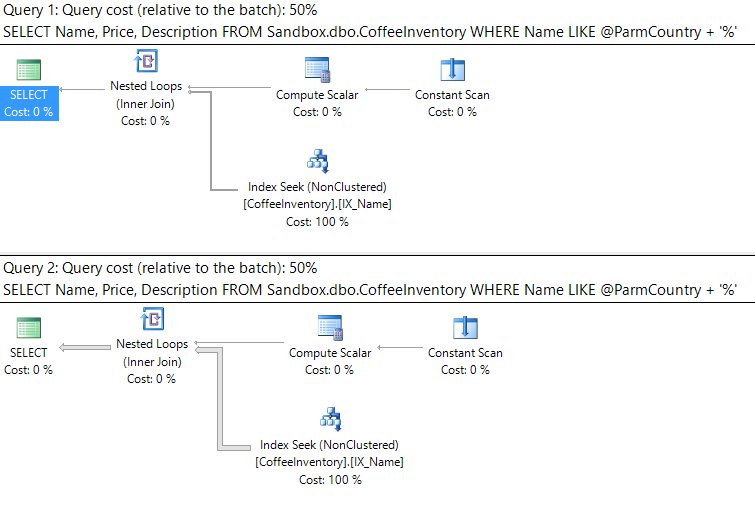
9a86e-1en_loooe8aojxr0jonohzg

Now our nonclustered index on Name is being utilized. Both queries are still receiving the same (albeit different) plan.

We didn't change anything with our stored procedure code, only the order that we executed the query with different parameters.

What the heck is going on here!?

This is an example of parameter sniffing. The first time a stored procedure (or query) is ran on SQL server, SQL will generate an execution plan for it and store that plan in the query plan cache:

SELECT
    c.usecounts,
    c.cacheobjtype,
    c.objtype,
    c.plan_handle,
    c.size_in_bytes,
    d.name,
    t.text,
    p.query_plan
FROM 
    sys.dm_exec_cached_plans c
    CROSS APPLY sys.dm_exec_sql_text(c.plan_handle) t
    CROSS APPLY sys.dm_exec_query_plan(c.plan_handle) p
    INNER JOIN sys.databases d
    ON t.dbid = d.database_id
WHERE 
    text like 'CREATE%CoffeeInventory%'

2c94d-1w8c6qvsh_ca3jumixdbnjw

All subsequent executions of that same query will go to the query cache to reuse that same initial query plan — this saves SQL Server time from having to regenerate a new query plan.

Note: A query with different values passed as parameters still counts as the "same query" in the eyes of SQL Server.

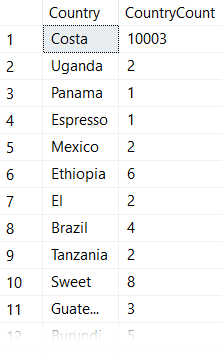
In the case of the examples above, the first time the query was executed was with the parameter for "Costa Rica". Remember when I said this dataset was heavily skewed? Let's look at some counts:

SELECT 
    LEFT(Name,CHARINDEX(' ',Name)) AS Country, 
    COUNT(*) AS CountryCount 
FROM dbo.CoffeeInventory 
GROUP BY 
    LEFT(Name,CHARINDEX(' ',Name))
109ae-1rdzlvzj99ccxpni3mwjnaw

"Costa Rica" has more than 10,000 rows in this table, while all other country names are in the single digits.

This means that when we executed our stored procedure for the first time, SQL Server generated an execution plan that used a table scan because it thought this would be the most efficient way to retrieve 10,003 of the 10,052 rows.

This table scan query plan is only optimal for Costa Rica . Passing in any other country name into the stored procedure would return only a handful of records, making it more efficient for SQL Server to use our nonclustered index.

However, since the Costa Rica plan was the first one to run, and therefore is the one that got added to the query plan cache, all other executions ended up using the same table scan execution plan.

After clearing our cached execution plan using DBCC FREEPROCCACHE, we executed our stored procedure again but with 'Ethiopia' as our parameter. SQL Server determined that a plan with an index seek is optimal to retrieve only 6 of the 10,052 rows in the table. It then cached that Index Seek plan, which is why the second time around the 'Costa Rica' parameter received the execution plan with Index Seek.

Ok, so how do I prevent parameter sniffing?

This question should really be rephrased as "how do I prevent SQL Server from using a sub-optimal plan from the query plan cache?"

Let's take a look at some of the techniques.

1. Use WITH RECOMPILE or OPTION (RECOMPILE)

We can simply add these query hints to either our EXEC statement:

EXEC dbo.FilterCoffee @ParmCountry = 'Ethiopia' WITH RECOMPILE
EXEC dbo.FilterCoffee @ParmCountry = 'Costa Rica' WITH RECOMPILE

or to our stored procedure itself:

DROP PROCEDURE IF EXISTS dbo.FilterCoffee
GO
CREATE PROCEDURE dbo.FilterCoffee
@ParmCountry varchar(30)
AS
BEGIN
    SELECT Name, Price, Description 
    FROM Sandbox.dbo.CoffeeInventory 
    WHERE Name LIKE @ParmCountry + '%'

    OPTION (RECOMPILE)

END
GO

What the RECOMPILE hint does is force SQL Server to generate a new execution plan every time these queries run.

Using RECOMPILE eliminates our parameter sniffing problem because SQL Server will regenerate the query plan every single time we execute the query.

The disadvantage here is that we lose all benefit from having SQL Server save CPU cycles by caching execution plans.

If your parameter sniffed query is getting ran frequently, RECOMPILE is probably a bad idea because you will encounter a lot of overheard to generate the query plan regularly.

If your parameter sniffed query doesn't get ran often, or if the query doesn't run often enough to stay in the query plan cache anyway, then RECOMPILE is a good solution.

2. Use the OPTIMIZE FOR query hint

Another option we have is to add either one of the following hints to our query. One of these would get added to the same location as OPTION (RECOMPILE) did in the above stored procedure:

OPTION (OPTIMIZE FOR (@ParmCountry UNKNOWN))

or

OPTION (OPTIMIZE FOR (@ParmCountry = 'Ethiopia'))

OPTIMIZE FOR UNKNOWN will use a query plan that's generated from the average distribution stats for that column/index. Often times it results in an average or bad execution plan so I don't like using it.

OPTIMIZE FOR VALUE creates a plan using whatever parameter value specified. This is great if you know your queries will be retrieving data that's optimized for the value you specified most of the time.

In our examples above, if we know the value 'Costa Rica' is rarely queried, we might optimize for index seeks. Most queries will then run the optimal cached query plan and we'll only take a hit when 'Costa Rica' is queried.

3. IF/ELSE

This solution allows for ultimate flexibility. Basically, you create different stored procedures that are optimized for different values. Those stored procedures have their plans cached, and then an IF/ELSE statement determines which procedure to run for a passed in parameter:

DROP PROCEDURE IF EXISTS dbo.FilterCoffee
GO
CREATE PROCEDURE dbo.FilterCoffee
@ParmCountry varchar(30)
AS
BEGIN
    IF @ParmCountry = 'Costa Rica'
    BEGIN
    EXEC dbo.ScanningStoredProcedure @ParmCountry
    END
    ELSE
    BEGIN
    EXEC dbo.SeekingStoredProcedure @ParmCountry
    END
END
GO

This option is more work (How do you determine what the IF condition should be? What happens more data is added to the table over time and the distribution of data changes?) but will give you the best performance if you want your plans to be cached and be optimal for the data getting passed in.

Conclusion

  1. Parameter sniffing is only bad when your data values are unevenly distributed and cached query plans are not optimal for all values.
  2. SQL Server caches the query plan that is generated from the first run of a query/stored procedure with whatever parameter values were used during that first run.
  3. Using the RECOMPILE hint is a good solution when your queries aren't getting ran often or aren't staying in the the query cache most of the time anyway.
  4. The OPTIMIZE FOR hint is good to use when you can specify a value that will generate a query plan that is efficient for most parameter values and are OK with taking a hit for a sub-optimal plan on infrequently queried values.
  5. Using complex logic (like IF/ELSE) will give you ultimate flexibility and performance, but will also be the worst for long term maintenance.


Are your indexes being thwarted by mismatched datatypes?

In this series I explore scenarios that hurt SQL Server performance and show you how to avoid them. Pulled from my collection of "things I didn't know I was doing wrong for years."


Watch this week's video on YouTube

Have you ever encountered a query that runs slowly, even though you've created indexes for it?

There's a few different reasons why this may happen. The one I see most frequently happens in the following scenario.

I'll have an espresso please

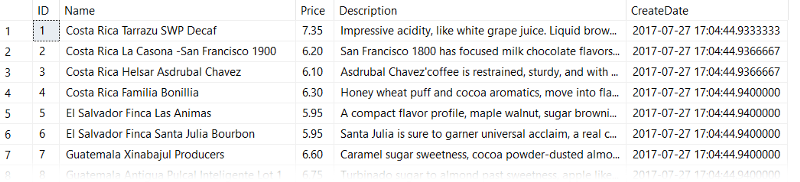
Let's say I have a table dbo.CoffeeInventory of coffee beans and prices that I pull from my favorite green coffee bean supplier each week. It looks something like this:

-- Make sure Actual Execution Plan is on
-- Let's see what our data looks like
SELECT * FROM dbo.CoffeeInventory

If you want to follow along, you can get this data set from this GitHub Gist

I want to be able to efficiently query this table and filter on price, so next I create an index like so:

CREATE CLUSTERED INDEX CL_Price ON dbo.CoffeeInventory (Price)

Now, I can write my query to find out what coffee prices are below my willingness to pay:

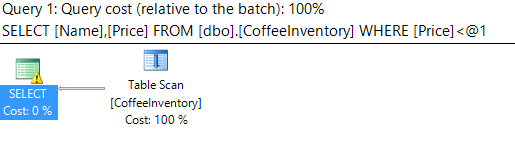
SELECT Name, Price FROM dbo.CoffeeInventory WHERE Price < 6.75

You would expect this query to be blazing fast and use a clustered index seek, right?

WRONG!

What the heck?

Why is SQL scanning the table when I added a clustered index on the column that I am filtering in my predicate? That's not how it's supposed to work!

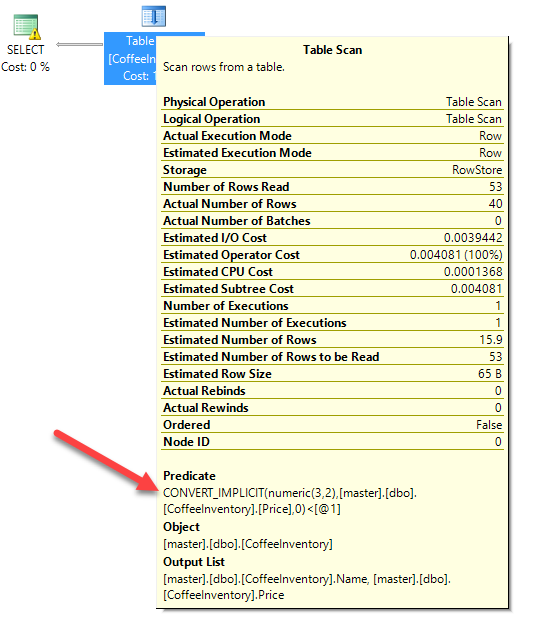
Well dear reader, if we look a little bit closer at the table scan operation, we'll notice a little something called CONVERT_IMPLICIT:

CONVERT_IMPLICIT: ruiner of fast queries

What is CONVERT_IMPLICIT doing? Well as it implies, it's having to convert some data as it executes the query (as opposed to me having specified an explicit CAST() or CONVERT() function in my query).

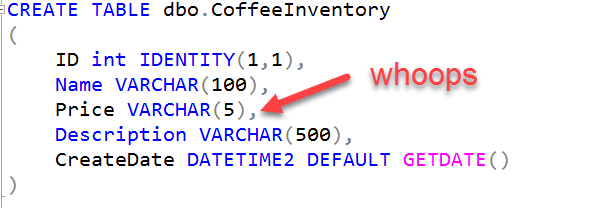
The reason it needs to do this is because I defined my Price column as a VARCHAR(5):

Who put numeric data into a string datatype? Someone who hasn't had their coffee yet today.

In my query however, I'm doing a comparison against a number WHERE Price < 6.75. SQL Server is saying it doesn't know how to compare a string to a number, so it has to convert the VARCHAR string to a NUMERIC(3,2).

This is painful.

Why? Because SQL is performing that implicit conversion to the numeric datatype for every single row in my table. Hence, it can't seek using the index because it ends up having to scan the whole table to convert every record to a number first.

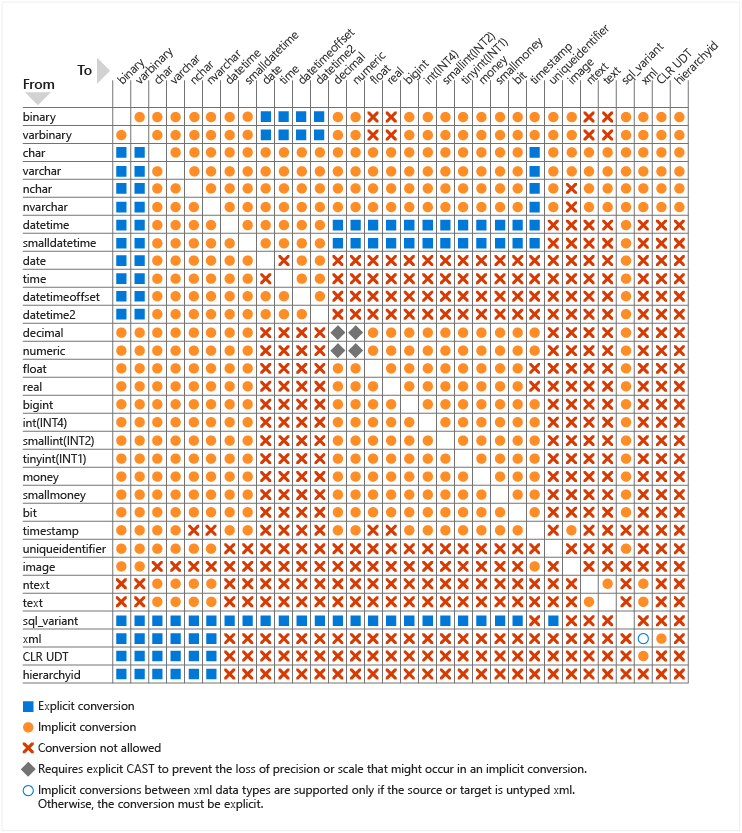
And this doesn't only happen with numbers and string conversion. Microsoft has posted an entire chart detailing what types of data type comparisons will force an implicit conversion:

<https://docs.microsoft.com/en-us/sql/t-sql/data-types/data-type-conversion-database-engine>

That's a lot of orange circles/implicit conversions!

How can I query my coffee faster?

Well in this scenario, we have two options.

  1. Fix the datatype of our table to align with the data actually being stored in this (data stewards love this).
  2. Not cause SQL Server to convert every row in the column.

Number 1 above is self-explanatory, and the better option if you can do it. However, if you aren't able to modify the column type, you are better off writing your query like this:

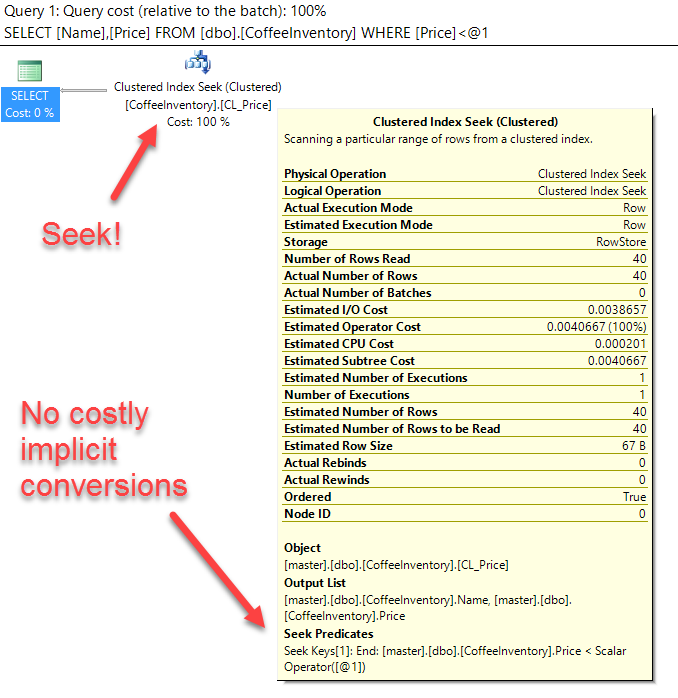
SELECT Name, Price FROM dbo.CoffeeInventory WHERE Price < '6.75'

d03ed-1uzge0e3lizkhtodyonsfmg

Since we do a comparison of equivalent datatypes, SQL Server doesn't need to do any conversions and our index gets used. Woo-hoo!

What about the rest of my server?

Remember that chart above? There are a lot of different data comparisons that can force a painful column side implicit conversion by SQL Server.

Fortunately, Jonathan Kehayias has written a great query that helps you find column side implicit conversions by querying the plan cache. Running his query is a great way to identify most of the implicit conversions happening in your queries so you can go back and fix them — and then rejoice in your improved query performance!

One SSMS Trick That Will Make You a Faster Query Builder

"17/365: i could be your magician" by Jin is licensed under CC BY 2.0

Watch this week's video on YouTube

Here's the scenario: you copy and paste some code into a query you are building. A few minutes later you need that same snippet again, but you've already copied and pasted something else onto the clipboard.

The next five minutes of your life are spent searching across the twenty query editor tabs you have open looking for that original piece of code.

Sound familiar?

THERE'S A BETTER WAY!

Copying and pasting is a feature that's available in nearly every text editor ("nearly" — anyone remember the days before iOS had a clipboard?).

However, SQL Server Management Studio goes above and beyond the regular copy and paste feature set — it has a clipboard ring.

What's a clipboard ring you ask?

ec575-1vgzb1j34ahgunbqofrgora

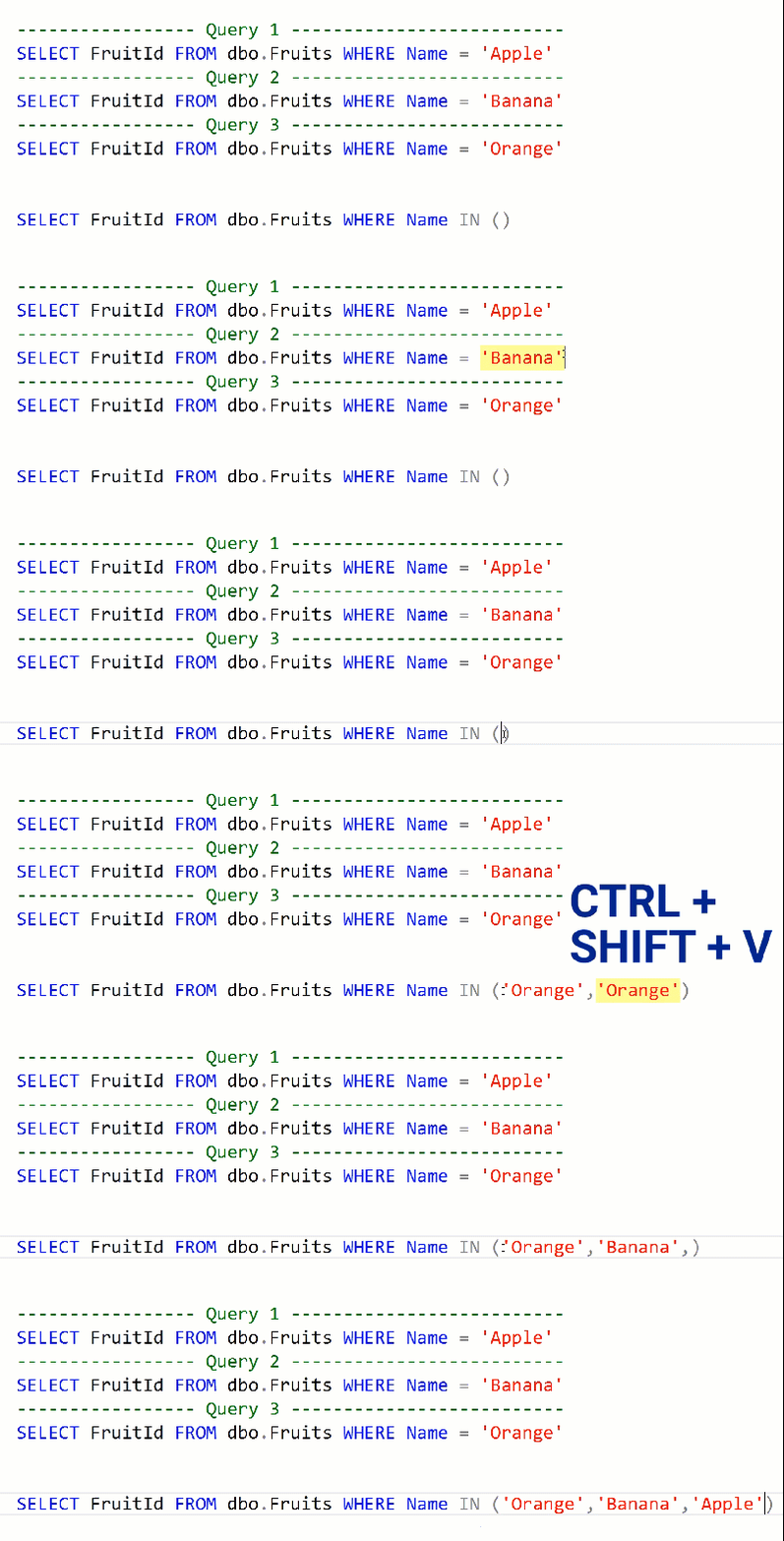
The clipboard ring let's you cycle through the last 20 things you copied onto your clipboard when you go to paste in SSMS. It can be accessed in the Edit menu (like in the screenshot above) or by using the keyboard shortcut CTRL + SHIFT + V.

Let's say you have the following queries:

----------------- Query 1 --------------------------
SELECT FruitId FROM dbo.Fruits WHERE Name = 'Apple'
----------------- Query 2 --------------------------
SELECT FruitId FROM dbo.Fruits WHERE Name = 'Banana'
----------------- Query 3 --------------------------
SELECT FruitId FROM dbo.Fruits WHERE Name = 'Orange'

And let's pretend you want to copy all of the fruit names into the IN statement of this query:

SELECT FruitId FROM dbo.Fruit WHERE Name IN ()

Instead of copying and pasting each fruit separately, you can batch your copies together and then paste them from the clipboard ring into your IN statement at the same time:

5c701-19e4bf0fjmtpji4ky8bz-mq

Use this trick the next time you need to find that snippet of code you used right before heading off to lunch and I guarantee you will be saving yourself tons of time.

How to Use SQL Temporal Tables For Easy Point-In-Time Analysis

"Bordeaux, The Grand Theatre" by Stefano Montagner is licensed under CC BY-NC-ND 2.0

Watch this week's video on YouTube

Have you ever needed to look at what data in a table used to look like?

If you have, it probably took a knuckle-cracking filled session of writing group-by statements, nested sub-queries, and window functions to write your time-travelling query.

Sorry for your lost day of productivity — I've been there too.

Fortunately for us, SQL Server 2016 introduces a new feature to make our point-in-time analysis queries easy to write: temporal tables.

Temporal Tables? Are Those The Same As Temporary Tables?

Don't let the similar sounding name fool you: "temporal" <> "temporary".

Temporal tables consist of two parts:

  1. The temporal table — this is the table that contains the current values of your data.
  2. The historical table — this table holds all of the previous values that at some point existed in your temporal table.

You might have created a similar setup yourself in previous versions of SQL using triggers. However, using a temporal table is different from this because:

  1. You don't need to write any triggers/stored procedures! All of the history tracking is done automatically by SQL Server.
  2. Retrieving the data uses a simple WHERE clause — no complex querying required.

I want to make my life easier by using temporal tables! Take my money and show me how!

I'm flattered by your offer, but since we are good friends I'll let you in on these secrets for free.

First let's create a temporal table. I'm thinking about starting up a car rental business, so let's model it after that:

IF OBJECT_ID('dbo.CarInventory', 'U') IS NOT NULL 
BEGIN
    -- When deleting a temporal table, we need to first turn versioning off
    ALTER TABLE [dbo].[CarInventory] SET ( SYSTEM_VERSIONING = OFF  ) 
    DROP TABLE dbo.CarInventory
    DROP TABLE dbo.CarInventoryHistory
END
CREATE TABLE CarInventory   
(    
    CarId INT IDENTITY PRIMARY KEY,
    Year INT,
    Make VARCHAR(40),
    Model VARCHAR(40),
    Color varchar(10),
    Mileage INT,
    InLot BIT NOT NULL DEFAULT 1,
    SysStartTime datetime2 GENERATED ALWAYS AS ROW START NOT NULL,
    SysEndTime datetime2 GENERATED ALWAYS AS ROW END NOT NULL,
    PERIOD FOR SYSTEM_TIME (SysStartTime, SysEndTime)     
)   
WITH 
( 
    SYSTEM_VERSIONING = ON (HISTORY_TABLE = dbo.CarInventoryHistory)   
)

The key things to note with our new table above are that

  1. it contains a PRIMARY KEY.
  2. it contains two datetime2 fields, marked with GENERATED ALWAYS AS ROW START/END.
  3. It contains the PERIOD FOR SYSTEM_TIME statement.
  4. It contains the SYSTEM_VERSIONING = ON property with the (optional) historical table name (dbo.CarInventoryHistory).

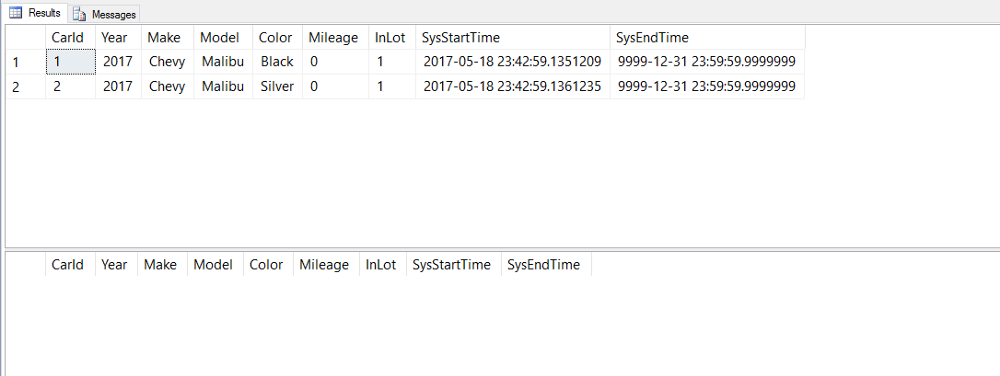
If we query our newly created tables, you'll notice our column layouts are identical:

SELECT * FROM dbo.CarInventory
SELECT * FROM dbo.CarInventoryHistory

Let's fill it with the choice car of car rental agencies all across the U.S. — the Chevy Malibu:

INSERT INTO dbo.CarInventory (Year,Make,Model,Color,Mileage) VALUES(2017,'Chevy','Malibu','Black',0)
INSERT INTO dbo.CarInventory (Year,Make,Model,Color,Mileage) VALUES(2017,'Chevy','Malibu','Silver',0)

Although we got some unassuming car models, at least we can express our individuality with two different paint colors!

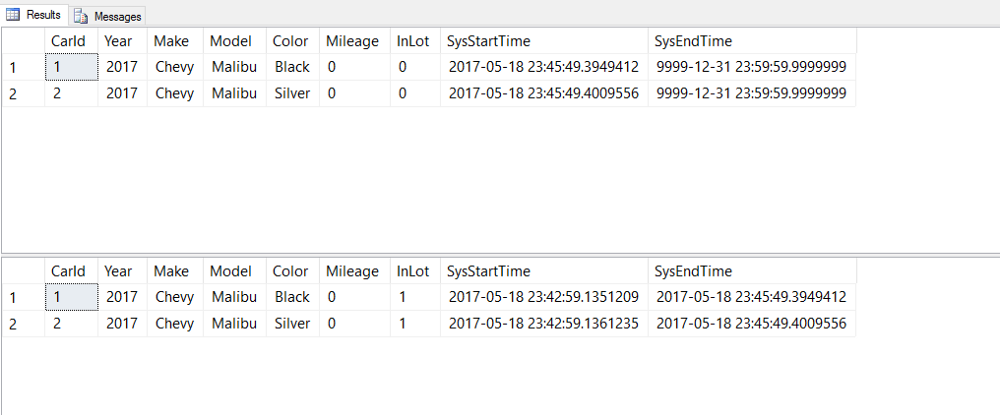
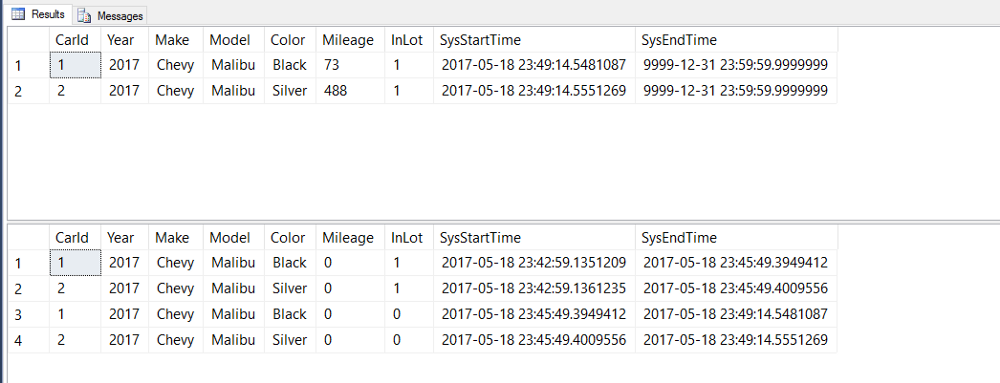
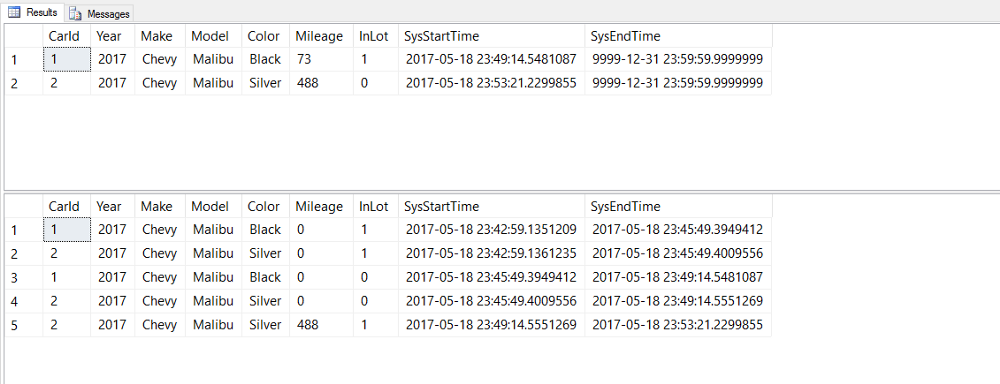
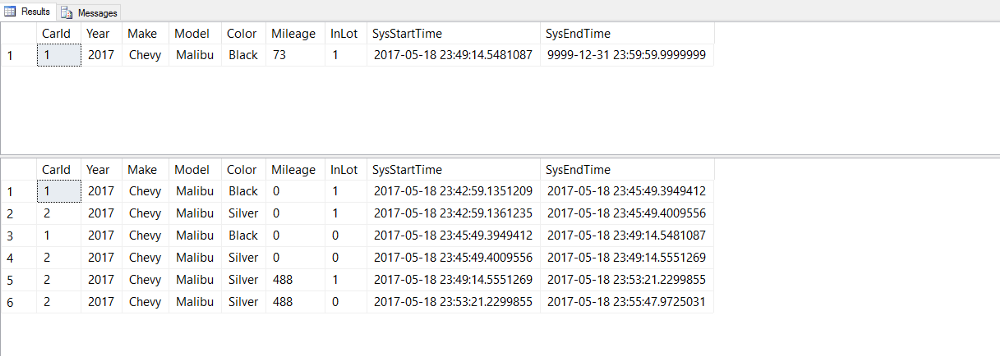
In all of the remaining screen shots, the top result is our temporal table dbo.CarInventory and the bottom result is our historical table dbo.CarInventoryHistory.

You'll notice that since we've only inserted one row for each our cars, there's no row history yet and therefore our historical table is empty.

Let's change that by getting some customers and renting out our cars!

UPDATE dbo.CarInventory SET InLot = 0 WHERE CarId = 1
UPDATE dbo.CarInventory SET InLot = 0 WHERE CarId = 2

3c413-1bm7zz7udxcqupl7lu08mdg

Now we see our temporal table at work: we updated the rows in dbo.CarInventory and our historical table was automatically updated with our original values as well as timestamps for how long those rows existed in our table.

After a while, our customers return their rental cars:

UPDATE dbo.CarInventory SET InLot = 1, Mileage = 73  WHERE CarId = 1
UPDATE dbo.CarInventory SET InLot = 1, Mileage = 488 WHERE CarId = 2

It's totally possible for someone to have driven 73 or 488 miles in a Chevy Malibu in under 4 minutes…ever hear the phrase "drive it like a rental"?

Our temporal table show the current state of our rental cars: the customers have returned the cars back to our lot and each car has accumulated some mileage.

Our historical table meanwhile got a copy of the rows from our temporal table right before our last UPDATE statement. It's automatically keeping track of all of this history for us!

Continuing on, business is going well at the car rental agency. We get another customer to rent our silver Malibu:

UPDATE dbo.CarInventory SET InLot = 0 WHERE CarId = 2

0ac4b-1oci0xi8evaahk8fidhj0fg

Unfortunately, our second customer gets into a crash and destroys our car:

DELETE FROM dbo.CarInventory WHERE CarId = 2

The customer walked away from the crash unscathed; the same can not be said for our profits.

With the deletion of our silver Malibu, our test data is complete.

Now that we have all of this great historically tracked data, how can we query it?

If we want to reminisce about better times when both cars were damage free and we were making money, we can write a query using SYSTEM_TIME AS OFto show us what our table looked like at that point in the past:

SELECT
    *
FROM 
    dbo.CarInventory
FOR SYSTEM_TIME AS OF '2017-05-18 23:49:50'

The good old days.

And if we want to do some more detailed analysis, like what rows have been deleted, we can query both temporal and historical tables normally as well:

-- Find the CarIds of cars that have been wrecked and deleted
SELECT DISTINCT
    h.CarId AS DeletedCarId
FROM
    dbo.CarInventory t
    RIGHT JOIN dbo.CarInventoryHistory h
    ON t.CarId = h.CarId 
WHERE 
    t.CarId IS NULL

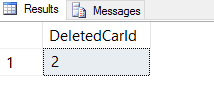
8c11d-1aaxrda5ljxkpenh9ei2t5a

C̶o̶l̶l̶i̶s̶i̶o̶n̶ Conclusion

Even with my car rental business not working out, at least we were able to see how SQL Server's temporal tables helped us keep track of our car inventory data.

I hope you got as excited as I did the first time I saw temporal tables in action, especially when it comes to querying with FOR SYSTEM_TIME AS OF. Long gone are the days of needing complicated queries to rebuild data for a certain point in time.

Here's a Quick Way To Generate a Running Total in SQL Server

da24c-105adqqwalb9gszttpjw23q

Watch this week's video on YouTube

Historically it's been difficult to accomplish certain tasks in SQL Server.

Probably the most annoying problem I had to do regularly before SQL Server 2012 was to generate a running total. How can a running total be so easy to do in Excel, but difficult to do in SQL?

SUM(), click, drag, done. Excel, you will always have a place in my heart.

Before SQL Server 2012, the solution to generating a running total involved cursors, CTEs, nested subqueries, or cross applies. This StackOverflow thread has a variety of solutions if you need to solve this problem in an older version of SQL Server.

However, SQL Server 2012's introduction of window functions makes creating a running total incredibly easy.

First, some test data:

CREATE TABLE dbo.Purchases
(
  CustomerID int,
  TransactionDate date,
  Price int
)
INSERT INTO dbo.Purchases VALUES (1,'2017-06-01',5)
INSERT INTO dbo.Purchases VALUES (1,'2017-06-15',8)
INSERT INTO dbo.Purchases VALUES (1,'2017-06-18',3)
INSERT INTO dbo.Purchases VALUES (1,'2017-06-30',6)
INSERT INTO dbo.Purchases VALUES (2,'2017-05-04',5)
INSERT INTO dbo.Purchases VALUES (2,'2017-06-04',5)
INSERT INTO dbo.Purchases VALUES (2,'2017-07-04',1)
INSERT INTO dbo.Purchases VALUES (3,'2017-05-01',2)
INSERT INTO dbo.Purchases VALUES (3,'2017-05-02',8)
INSERT INTO dbo.Purchases VALUES (3,'2017-05-03',9)
INSERT INTO dbo.Purchases VALUES (3,'2017-05-04',5)
INSERT INTO dbo.Purchases VALUES (3,'2017-05-05',4)
INSERT INTO dbo.Purchases VALUES (3,'2017-05-06',2)

6a0d6-1wnrnamwua7g-rnvwtlgyzw

Next, we write our query using the following window function OVER() syntax:

SELECT
  CustomerID,
  TransactionDate,
  Price,
  SUM(Price) OVER (PARTITION BY CustomerID ORDER BY TransactionDate) AS RunningTotal
FROM
  dbo.Purchases

The syntax for our OVER() clause is simple:

  • SUM(Price) specifies which column we are creating the running total on
  • PARTITION BY specifies around what group of data we want to create our "window" — each new window will reset the running total
  • ORDER BY specifies in what order the rows should be sorted before being summed

The results? An easy to write running total:

52df1-1_ulawysmk6gmrjzvuaijgq