Data with Bert logo

Importing GeoJSON Earthquake Data Into SQL Server

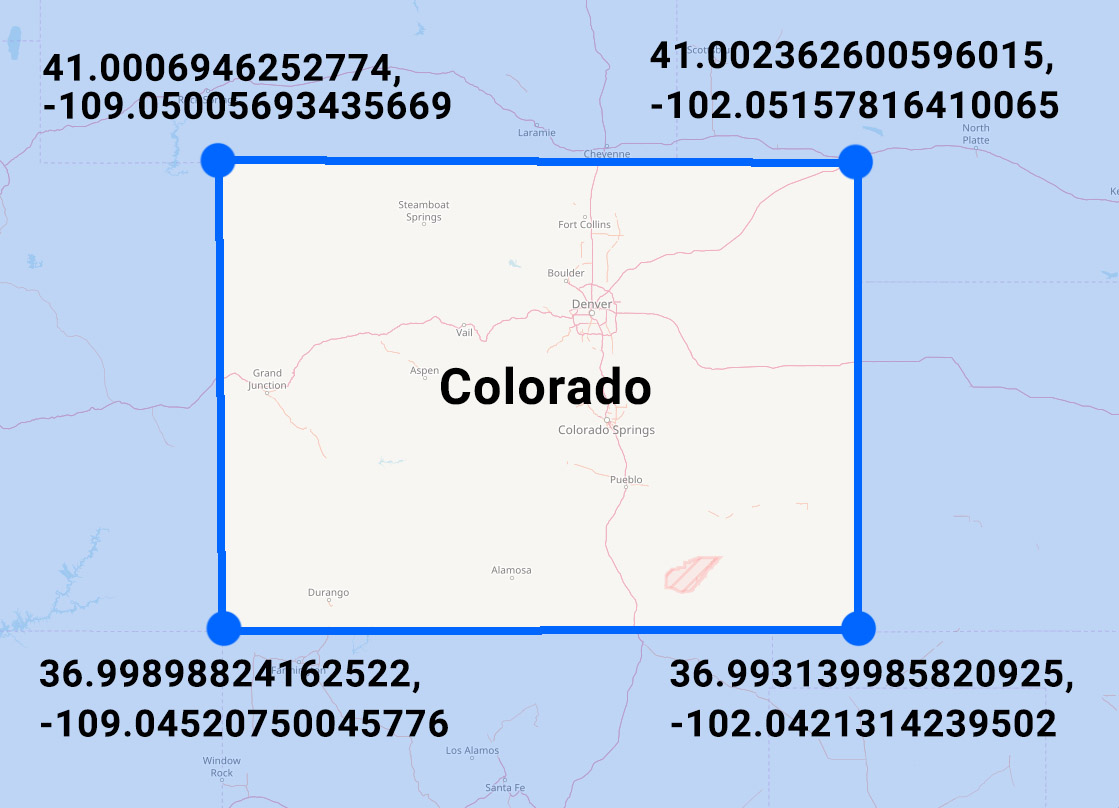
IMG_0397 A significant portion of Yellowstone National Park sits on top of a supervolcano.  Although it's not likely to erupt any time soon, the park is constantly monitored for geological events like earthquakes.
This week I want to take a look at how you can import this earthquake data, encoded in GeoJSON format, into SQL Server in order to be able to analyze it using SQL Server's spatial functions.

Watch this week's video on YouTube

GeoJSON

The source for the data we'll be using is the 30-day earthquake feed from the USGS.  This data is encoded in the GeoJSON format, a specification that makes it easy to share spatial data via JSON.  To get an idea of how it looks, here's an extract:

{
    "type": "FeatureCollection",
    "metadata": {
        "generated": 1515603955000,
        "url": "https://earthquake.usgs.gov/earthquakes/feed/v1.0/summary/1.0_month.geojson",
        "title": "USGS Magnitude 1.0+ Earthquakes, Past Month",
        ...
    },
    "features": [{
            "type": "Feature",
            "properties": {
                "mag": 1.25,
                "place": "7km NW of The Geysers, CA",
                "time": 1515603166510,
                ...
            },
            "geometry": {
                "type": "Point",
                "coordinates": [-122.8221664, 38.8175011, 2.02]
            },
            "id": "nc72952110"
        },
        ...
        ],
    "bbox": [-179.921, -62.519, -3.35, 179.9551, 85.3951, 608.58]
}

The key thing we'll be examining in this data is the "features" array: it contains one feature object for each earthquake that's been recorded in the past 30 days.  You can see the "geometry" child object contains lat/long coordinates that we'll be importing into SQL Server.

If you want the same 30-day GeoJSON extract we'll be using in all of the following demo code, you can download it here.

Importing GeoJSON into SQL Server

There's no out of the box way to import GeoJSON data into SQL Server.

However, using SQL Server's JSON functions we can build our own solution pretty easily.

First, let's create a table where we can store all of earthquake data:

CREATE TABLE dbo.EarthquakeData
(
    Id int IDENTITY PRIMARY KEY,
    EventDate DATETIME2,
    Magnitude FLOAT,
    Place VARCHAR(300),
    Coordinates GEOGRAPHY,
    Long varchar(100),
    Lat varchar(100)
)

CREATE SPATIAL INDEX IX_Coordinates ON dbo.EarthquakeData (Coordinates)

Then, let's use the OPENJSON() function to parse our JSON and insert it into our table:

DECLARE @GeoJSON nvarchar(max) = N'{...}' -- Put the GeoJSON here

INSERT INTO dbo.EarthquakeData (EventDate,Magnitude,Place,Coordinates,Long,Lat)
SELECT 
    -- Convert unix epoch time to datetime
    -- We also know the source is in UTC, so we specify that using AT TIME ZONE for easier conversions down the road
    DATEADD(second,cast(UnixMillisecondsSinceEpoch/1000 as int),'1970-01-01 00:00:00') AT TIME ZONE 'UTC' AS EventDate,
    Magnitude,
    Place,
    -- Build our geography datatype
    geography::STPointFromText('POINT ('+Long + ' ' + Lat + ')', 4326) AS Geography,
    Long,
    Lat
FROM 
    OPENJSON(@GeoJSON, '$.features')
        WITH (
            UnixMillisecondsSinceEpoch bigint '$.properties.time',
            Magnitude float '$.properties.mag',
            Place varchar(300) '$.properties.place',
            Long varchar(100) '$.geometry.coordinates[0]',
            Lat varchar(100) '$.geometry.coordinates[1]'
        )

We use OPENJSON() to parse our JSON hierarchy and then concatenate together the lat and long values into our well known text format to be able to use it with SQL Server's spatial function STPointFromText:

SELECT geography::STPointFromText('POINT ('+Long + ' ' + Lat + ')', 4326) AS Geography

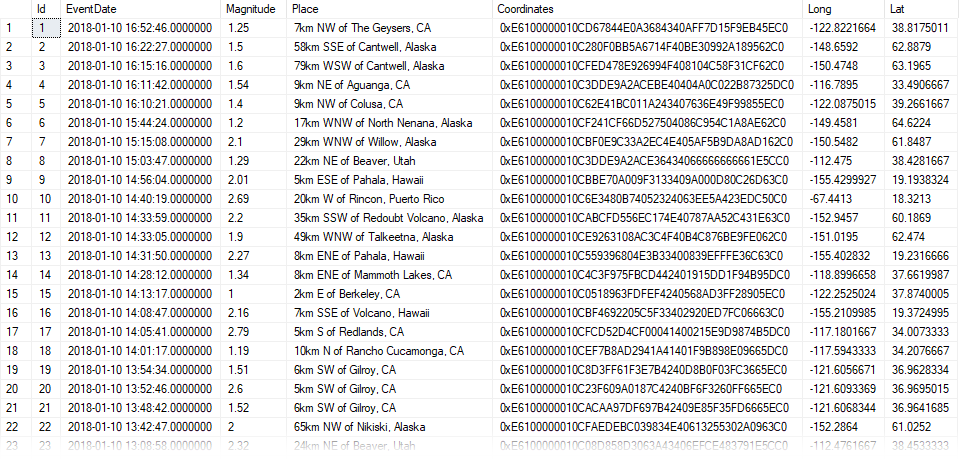
What results is our earthquake data all nicely parsed out into our dbo.EarthquakeData table:

Earthquake-data-parsed

What about Yellowstone?

The above data includes earthquakes from around world.  Since we only want to examine earthquakes in Yellowstone, we'll need to filter the data out.

There's a handy Place column in the data that we could probably add a LIKE '%yellowstone%' filter to - but this is a post about spatial data in SQL, we can do better!

The Wyoming State Geological Survey website has Shapefiles for the boundary of Yellowstone National Park.  Since we are practicing our GeoJSON import skills, I converted the Shapefiles to GeoJSON using an online converter and the resulting data looks like this:

{
    "type": "FeatureCollection",
    "bbox": [-111.15354785438899, 44.13238494057162, -109.816111731858, 45.102865336505396],
    "features": [{
        "type": "Feature",
        "geometry": {
            "type": "Polygon",
            "coordinates": [
                [
                    [-111.0970801722779, 44.487322588834374],
                    [-111.09707931336956, 44.48929779632266],
                    [-111.09707877845554, 44.49109904485493],
                    [-111.09707888353985, 44.49472122457225],.
                    ...
                ]
            ]
        },
        ...
    }]
}

You can download the full park boundary GeoJSON file here.

Just like before, we'll use SQL Server's OPENJSON() function to parse our GeoJSON data into a well-known text POLYGON.

First we create our table:

DROP TABLE IF EXISTS dbo.ParkBoundaries
CREATE TABLE dbo.ParkBoundaries
(
    Id int IDENTITY PRIMARY KEY,
    ParkName varchar(100),
    ParkBoundary GEOGRAPHY
)
CREATE SPATIAL INDEX IX_Boundary ON dbo.ParkBoundaries (ParkBoundary)

And then populate it, this time using the STPolyFromText spatial function:

INSERT INTO dbo.ParkBoundaries (ParkName, ParkBoundary)
SELECT
    'Yellowstone National Park' AS ParkName,
    geography::STPolyFromText('POLYGON ((' + STRING_AGG(CAST(Long + ' ' + Lat as varchar(max)), ',') + '))',4326).ReorientObject() AS ParkBoundary
FROM
    (
    SELECT 
        Long,
        Lat
    FROM
        OPENJSON(@Yellowstone, '$.features[0].geometry.coordinates[0]')
        WITH
            (
                Long varchar(100) '$[0]',
                Lat varchar(100) '$[1]'
            )
)d

Filtering our data

Now we have two tables: dbo.EarthquakeData and dbo.ParkBoundaries.  What we want to do is select only the Earthquake data points that fall within the boundaries of Yellowstone National Park.

This is easy to do using the STIntersects spatial function, which returns a "1" for any rows where one geography instance (our lat/long earthquake coordinate) intersects another geography instance (our park boundary):

SELECT 
    d.Id,
    d.Magnitude,
    d.EventDate,
    d.Place,
    b.ParkName
FROM 
    dbo.EarthQuakeData d
    CROSS JOIN dbo.ParkBoundaries b
WHERE
    Coordinates.STIntersects(ParkBoundary) =1
    AND b.ParkName = 'Yellowstone National Park'
ORDER BY
    Magnitude DESC

The rest is up to you

So all it takes to import GeoJSON data into SQL Server is knowing how to use SQL Server's JSON functions.

Once geographical data is imported into geography data types, SQL Server's spatial functions offer lots of flexibility for how to efficiently slice and dice the data.

I Have A SQL Login - Why Can't I Connect?

tsqltuesdaylogo

This post is a response to this month's T-SQL Tuesday prompt created by Arun SirpalAdam Machanic created T-SQL Tuesday as a way for SQL users to share ideas about interesting topics. This month's topic is "Your Technical Challenges Conquered".


DBA Skills 101: SQL Logins

While writing last week's post about efficiently scripting database objects, I decided to make progress towards my 2018 learning goals by figuring out what database permissions were needed for running SQL Server Management Studio's "Generate Scripts" tool.

I thought it would be best to start with a clean slate so I created a new SQL login and database user so that I could definitively figure out which permissions are needed.

Normally I use Windows Authentication for my logins, but this time I thought "since I'm getting crazy learning new things, let me try creating a SQL Login instead."

After I created my login, I decided to test connecting to my server before digging into the permissions.  Result?

Watch this week's video on YouTube

I can't connect!

That's right, I tried to connect and I got this very detailed error message :

Login failed for user Microsoft SQL Server Error: 18456

"Great," I thought.  "I should just switch to a Windows Authentication login, those always work for me."

"BUT NO, THEN I WON'T LEARN ANYTHING!"

On to troubleshooting

First things first, I tried retyping my login and password (I know typing in the password of "password" is really tricky but I've made mistakes doing much simpler things).

No luck.  Maybe when I created the login I fat-fingered the password?

I recreated the login, making sure I precisely typed the password.  Try to connect again...nope.

Ok, ok.  I'm missing something obvious.  I have this error message though - maybe the internet will know!

I find the exact error message in a blog post by Aaron Bertrand - he's a credible guy, I bet I'll find the solution there!

Nope.

(Side note: the answer is there, just buried in the comments.  In my eager "this will be an easy solution" I didn't bother scrolling down that far).

Ok... how about books online?  Even though I created the login through the SSMS GUI, I know the T-SQL command to do the same is CREATE LOGIN.  Maybe I'll find the solution in the documentation?

No luck.

(Side note again: in hindsight you can get to the solution from the above link, but it's buried two further links deep.  While troubleshooting I was in the mindset of "ain't nobody got time for that" - I wanted a solution given to me immediately without having to do any further research!)

I kept searching online, reading through Stack Overflow answers, not finding what I needed.

(Side note (last one, I promise): anyone else having a harder time searching for relevant Stack Overflow answers?  It feels like more and more I find questions/answers that are for older versions and no longer relevant)

At this point I was really frustrated.  "CREATING A LOGIN SHOULD BE LIKE THE FIRST THING A DBA LEARNS!! WHY IS THIS SO HARD?!?!?!?!?!?!"

At that point I was tired and disappointed that I had spent more time trying to solve this login problem rather than actually figuring out the permissions that I wanted to include in my blog post.

Sleep

I decided to take a break for the night and revisit the problem the next morning.

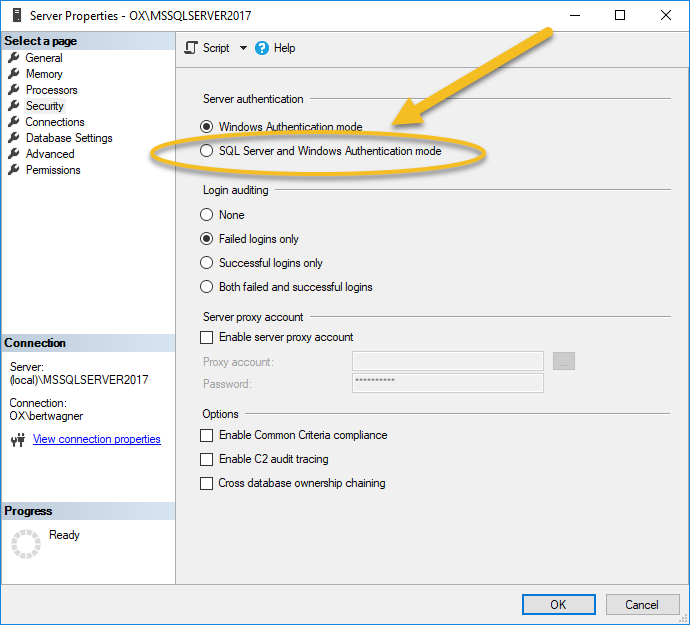
As expected, I searched the internet for the answer again and somehow my keyword selection hit the jackpot - I found the Stack Overflow answer telling me I needed to set the server to mixed authentication mode:

mixed-authentication-mode

Wow, that was easy.

Takeaway

This wasn't a complex problem.  At least, it shouldn't have been a complex problem.

All in all I spent probably 30 minutes trying to figure it out - not the longest amount of time I've sunk into a problem that ended up having a really simple solution.

However, this stuff happens.  It's amazing what a fresh (rested) set of eyes can do for solving a problem.

Lesson learned: next time I'm getting frustrated by a problem that I think should be easy to solve, I need to step away from the computer and come back once I have a clearer mindset :).

One Last Technical Challenge (BONUS)

I figured I'd add one more technical challenge to this post: submit a pull request to the sql-docs GitHub.

My rationale was that I couldn't be the only person to have ever been stumped by authentication modes.  Maybe I could be helpful to the next person who visits the CREATE LOGIN books online page and give them a hint as to why they can't connect.

Contributing to open source isn't something I've done through Github before, but luckily I had Steve Jones's excellent write up to guide me.

There were no real challenges here since I was just making a simple edit, and low and behold a few days later my PR got merged and is now live in BOL - cool!

A Better Way To Script Database Objects

Happy New Year! My New Year's resolution for 2018 is to help you become a better SQL developer.

I want to start off with that today by showing you a much better way to generate database object change scripts.

Watch this week's video on YouTube

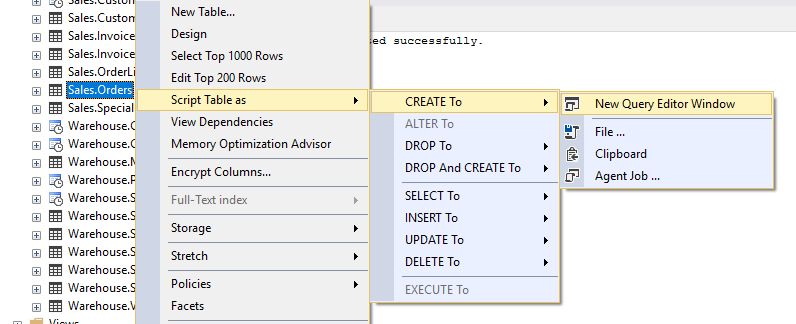
If you are like I used to be for YEARS, anytime you want to copy a table, index, etc... you probably right click on that object in SQL Server Management Studio and click "Script as" > "CREATE To":

old-create-to An inefficient way of generating change scripts
This is a pretty easy way to quickly script database objects, however it's incomplete.

For starters, I'm forced to generate the scripts for tables one at a time.  Not fun.

Additionally, if I want to script associated objects for that table, like indexes, I have to go to each index and then right-click and select "Script Index as".  Ugh.

There Is A Better Way

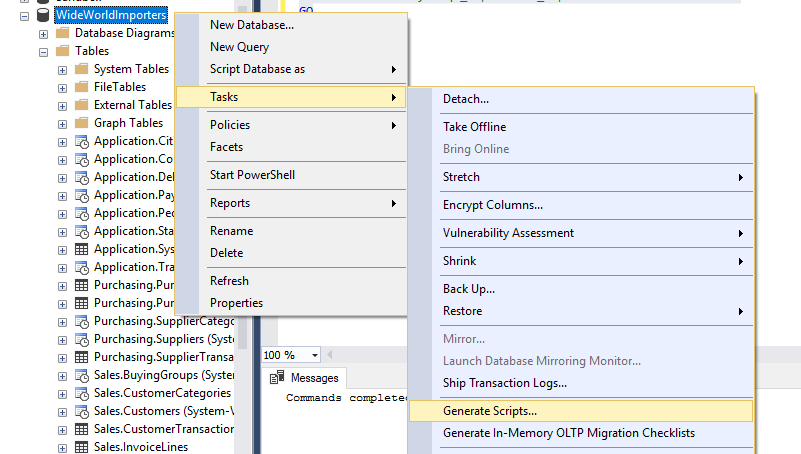
Instead of using "Script Table as", you can right click on your database and choose "Tasks" > "Generate Scripts...":

generate-scripts

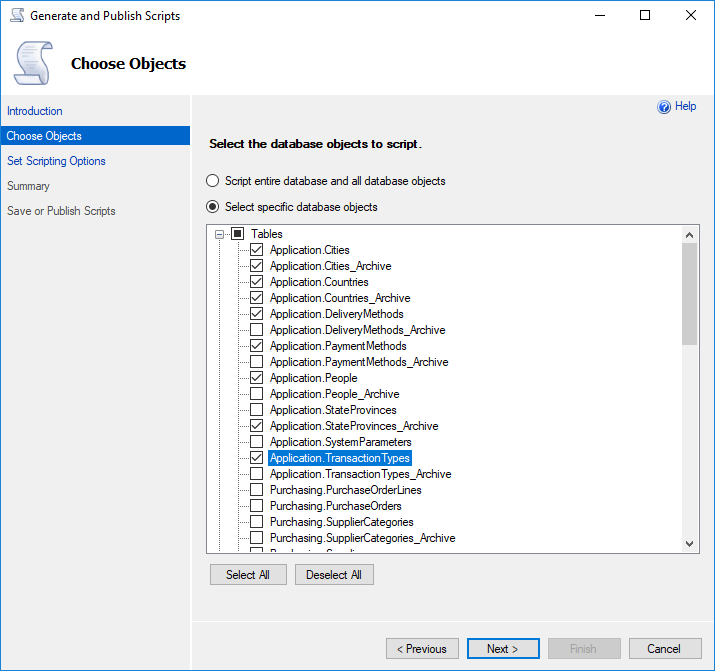
This option brings up a GUI that will allow you to script multiple objects at the same time:

multiple-objects-at-once Look ma, multiple objects at once!

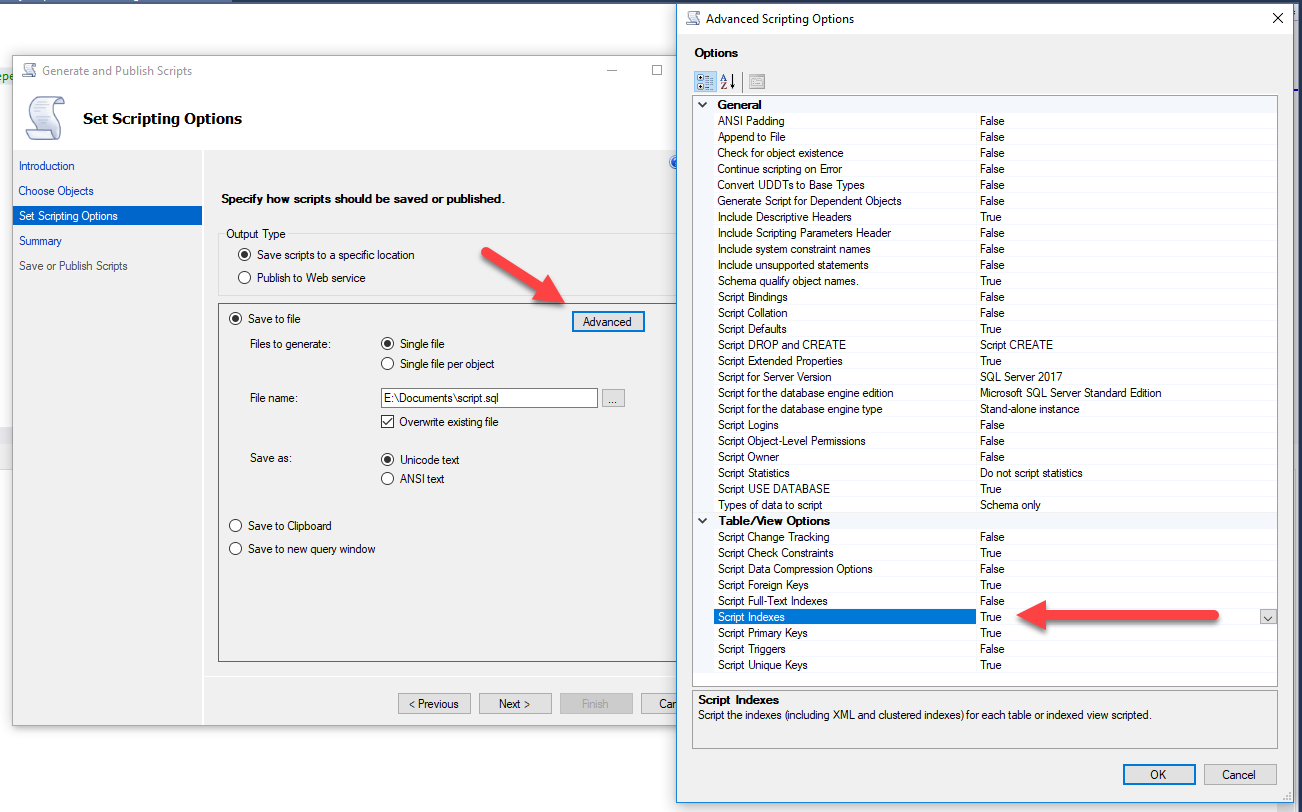
Additionally if you click the "Advanced" button in the final page of the dialog, you will receive many more options for how your objects will get scripted, including the ability to script out the indexes!

script-indexes Ooooooo, ahhhh - everything scripted in one fell swoop!

Using the Generate Scripts Task it's easy to generate table, index, stored procedure, etc... change scripts all in one step - nice!

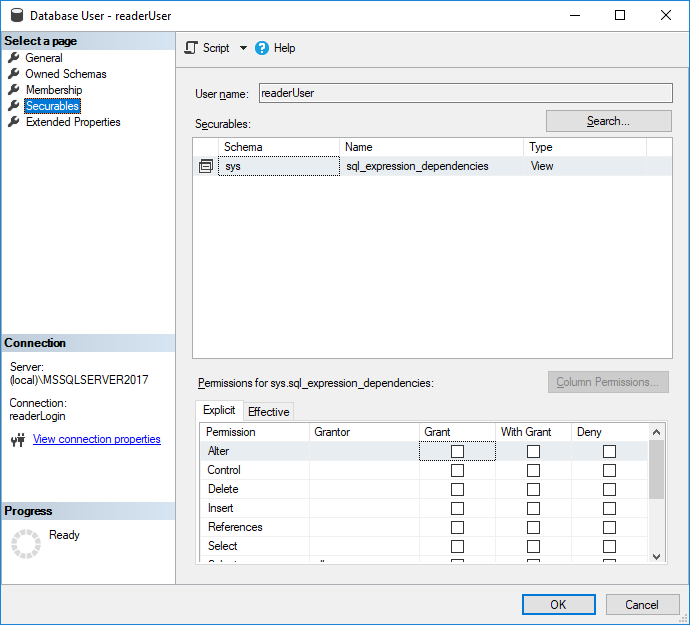
NOTE: If your SQL User receives an error when trying to generate the scripts, make sure they have the following access:

USE [MyDatabase]
GO

GRANT VIEW DEFINITION TO [MyUser]
GO

GRANT SELECT ON sys.sql_expression_dependencies TO [MyUser]
GO

sql_expression_dependceis

SQL and NOT SQL: Best of 2017

Picture1-e1513781747981

With only a few days left in 2017, I thought it would be fun to do a year in review post.  Below you'll find some of my top 5 favorites in a variety of SQL and non-SQL related categories.  Hope you enjoy and I'll see you with new content in 2018!

Watch this week's video on YouTube

Top 5 Blog Posts

"Top 5" is totally subjective here.  These aren't necessarily ordered by view counts, shares, or anything like that.  These just happen to be my personal favorites from this year.

Top 5 Vlogs

You guys watched over 500 hours of my  videos this year, thank you!

Watch this week's video on YouTube

Watch this week's video on YouTube

Watch this week's video on YouTube

Watch this week's video on YouTube

Watch this week's video on YouTube

I think the content of this last video is good, but I don't actually like anything else about it.  Why did I bother including it then?

It's the first SQL Server vlog I made this year.  I'm a little embarrassed by how bad it is, but I keep it up as motivation for myself to see how much I've improved since I started filming videos.

If you ever think you want to start doing something - just start doing it.  Keeping track of progress and watching how you evolve is extremely rewarding.

Top 5 Posts That Never Got Written

I keep a list of post ideas.  Here are 5 ideas I didn't get to this year.

I'm not ruling out ever writing them, but don't hold your breath.  If you are ambitious, feel free to steal them for yourself - just let me know when you do because I'd love to read them!

  • "ZORK! in SQL" - I actually think it would be really fun to program one of my favorite text based games in SQL Server.  Don't get eaten by a grue!
  • "How To Fly Under Your DBA's Radar" - this could really go either way: how to do sneaky things without your DBA knowing OR how to be a good SQL developer and not get in trouble with your DBA.
  • "Geohashing in SQL Server" - Geohashes are really cool.  It'd be fun to write about how to create them in SQL Server (probably a CLR, but it might be able to be done with some crazy t-sql).
  • "A SQL Magic Trick"- from the age of 12-18 I worked as a magician.  Sometimes I dream of teaching a SQL concept via a card trick.  Don't rule this one out.
  • "Alexa DROP DATABASE"- write an Alexa skill to manage your Azure SQL instance.  I know this is technically feasible, I don't know how useful this would be.

Top 5 Tweets/Instagrams

I'm not a huge social media guy to begin with, but I do like sharing photos.

https://www.instagram.com/p/BTynN1gjTyj/

https://twitter.com/bertwagner/status/903712788538949633

https://twitter.com/bertwagner/status/894373268857212929

https://www.instagram.com/p/BP08U99j3Wh/

https://twitter.com/bertwagner/status/892717494166802432

Top 5 Catch-All

These are some of the random things that helped me get through the year.

  • Red Bird Coffee.  This is premium coffee at affordable prices.  The Ethiopian Aricha is the best coffee I've ever had - tastes like red wine and chocolate.
  • Vulfpeck's The Beautiful Game - I listened to this album more than any other to get into a working groove.  So funky.
  • Pinpoint: How GPS Is Changing Technology, Culture, and Our Minds - This was probably my favorite book of the year.  If you ever wonder how GPS works, or the implications of a more connected world, this book was absolutely fascinating.
  • LED Lighting Strips - I put these behind my computer monitors to create some nice lighting for filming, but I've found myself leaving them on all the time because they add a nice contrasting back light to my screens.
  • BONUS! Mechanical Keyboard - This thing is inexpensive, but amazing.  I didn't realize what I was missing out until I started typing on it.  The sound of the clacking keys brought on an immediate flashback to the 1990s when I last had a mechanical keyboard.  I don't know if it allows me to type faster like many users claim, but I am definitely happier typing on it. CLACK! CLACK! CLACK!

How To Create Multi-Object JSON Arrays in SQL Server

blog-image

Recently I was discussing with Peter Saverman whether it would be possible to take some database tables that look like this:

2017-12-16_10-34-48

And output them so that the Cars and Toys data would map to a multi-object JSON array like so:

2017-12-16_10-38-51

Watch this week's video on YouTube

Why would you ever need this?

If you are coming from a pure SQL background, at this point you might be wondering  why you would ever want create an object array that contains mixed object types.  Well, from an application development standpoint this type of scenario can be fairly common.

In a database, it makes sense to divide Home and Car and Toy into separate tables.  Sure, we could probably combine the latter two with some normalization, but imagine we will have many different types of entities that will be more difficult to normalize - sometimes it just makes sense to store this information separately.

Not to mention that performing analytical type queries across many rows of data will typically be much faster stored in this three table format.

The three table layout, while organized from a database standpoint, might not be the best way to organize the data in an object-oriented application.  Usually in a transaction oriented application, we want our data to all be together as one entity.  This is why NoSQL is all the rage among app developers.  Having all of your related data all together makes it easy to manage, move, update, etc...  **This is where the array of multi-type objects comes in - it'd be pretty easy to use this structure as an array of dynamic or inherited objects inside of our application.

Why not just combine these Car and Toy entities in app?

Reading the data into the app through multiple queries and mapping that data to objects is usually the first way you would try doing something like this.

However, depending on many different variables, like the size of the data, the number of requests, the speed of the network, the hardware the app is running on, etc... mapping your data from multiple queries might not be the most efficient way to go.

On the other hand, if you have a big beefy SQL Server available that can do those transformations for you, and you are willing to pay for the processing time on an \$8k/core enterprise licensed machine, then performing all of the these transformations on your SQL Server is the way to go.

The solution

UPDATE: Jovan Popovic suggested an even cleaner solution using CONCAT_WS.  See the update at the bottom of this post.

First, here's the data if you want to play along at home:

DROP TABLE IF EXISTS ##Home;
GO
DROP TABLE IF EXISTS ##Car;
GO
DROP TABLE IF EXISTS ##Toy;
GO

CREATE TABLE ##Home
(
    HomeId int IDENTITY PRIMARY KEY,
    City nvarchar(20),
    State nchar(2)
);
GO

CREATE TABLE ##Car
(
    CarId int IDENTITY PRIMARY KEY,
    HomeId int,
    Year smallint,
    Make nvarchar(20),
    Model nvarchar(20),
    FOREIGN KEY (HomeId) REFERENCES ##Home(HomeId)
);
GO

CREATE TABLE ##Toy
(
    ToyId int IDENTITY PRIMARY KEY,
    HomeId int,
    Category nvarchar(20),
    RiderCapacity int,
    FOREIGN KEY (HomeId) REFERENCES ##Home(HomeId)
);
GO

INSERT INTO ##Home (City,State) VALUES ('Cleveland','OH')
INSERT INTO ##Home (City,State) VALUES ('Malibu','CA')

INSERT INTO ##Car (HomeId,Year, Make, Model) VALUES ('1','2017', 'Volkswagen', 'Golf')
INSERT INTO ##Car (HomeId,Year, Make, Model) VALUES ('2','2014', 'Porsche', '911')

INSERT INTO ##Toy (HomeId,Category, RiderCapacity) VALUES ('1','Bicycle', 1)
INSERT INTO ##Toy (HomeId,Category, RiderCapacity) VALUES ('2','Kayak', 2)

SELECT * FROM ##Home
SELECT * FROM ##Car
SELECT * FROM ##Toy

And here's the query that does all of the transforming:

SELECT 
    h.HomeId,
    h.City,
    h.State,
    GarageItems = JSON_QUERY('[' + STRING_AGG( GarageItems.DynamicData,',') + ']','$')
FROM
    ##Home h
    INNER JOIN
    (
        SELECT
            HomeId,
            JSON_QUERY(Cars,'$') AS DynamicData
        FROM
            ##Home h
            CROSS APPLY
            (
            SELECT 
                (
                SELECT  
                    *
                FROM
                    ##Car c
                WHERE
                    c.HomeId = h.HomeId
                    FOR JSON PATH, WITHOUT_ARRAY_WRAPPER
                ) AS Cars
            ) d 
        UNION ALL
        SELECT
            HomeId,
            JSON_QUERY(Cars,'$') AS DynamicData
        FROM
            ##Home h
            CROSS APPLY
            (
            SELECT 
                (
                SELECT  
                    *
                FROM
                    ##Toy c
                WHERE
                    c.HomeId = h.HomeId
                    FOR JSON PATH, WITHOUT_ARRAY_WRAPPER
                ) AS Cars
            ) d
    ) GarageItems
        ON h.HomeId = GarageItems.HomeId
GROUP BY
    h.HomeId,
    h.City,
    h.State

There are a couple of key elements that make this work.

CROSS APPLY

When using FOR JSON PATH , ALL rows and columns from that result set will get converted to a single JSON string.

This creates a problem if, for example, you want to have a column for your JSON string and a separate column for something like a foreign key (in our case, HomeId).  Or if you want to generate multiple JSON strings filtered on a foreign key.

The way I chose to get around this is to use CROSS APPLY with a join back to our Home table - this way we get our JSON string for either Cars or Toys created but then output it along with some additional columns.

WITHOUT_ARRAY_WRAPPER

When using FOR JSON PATH to turn a result set into a JSON string, SQL Server will automatically add square brackets around the JSON output as if it were an array.

This is a problem in our scenario because when we use FOR JSON PATH to turn the Car and Toy table into JSON strings, we eventually want to combine them together into the same array instead of two separate arrays.  The solution to this is using the WITHOUT_ARRAY_WRAPPER option to output the JSON string without the square brackets.

Conclusion

Your individual scenario and results may vary.  This solution was to solve a specific scenario in a specific environment.

Is it the right way to go about solving your performance problems all of the time? No.  But offloading these transformations onto SQL Server is an option to keep in mind.

Just remember - always test to make sure your performance changes are actually helping.

UPDATED Solution Using CONCAT_WS:

This solution recommended by Jovan Popovic is even easier than above.  It requires using CONCAT_WS, which is available starting in SQL Server 2017 (the above solution requires STRING_AGG which is also in 2017, but it could be rewritten using FOR XML string aggregation if necessary for earlier versions)

SELECT h.*,
'['+ CONCAT_WS(',',
(SELECT * FROM ##Car c WHERE c.HomeId = h.HomeId FOR JSON PATH, WITHOUT_ARRAY_WRAPPER),
(SELECT * FROM ##Toy t WHERE t.HomeId = h.HomeId FOR JSON PATH, WITHOUT_ARRAY_WRAPPER)
)
+ ']'
FROM ##Home h