
Data with Bert logo

Automating Database Maintenance with Jess Pomfret and dbatools

Watch this week's video on YouTube

dbatools is one of the coolest community projects I've seen - it is amazing how many commands are available to help make managing your SQL Server instances a breeze.

This week I had the opportunity to learn how to use dbatools to automate backups, change recovery models, and discover additional dbatools commands from dbatools contributor Jess Pomfret.

The video above goes over the basics, but be sure to check out Jess's companion blog post to learn more about these commands.

And once you start using dbatools and have ideas for adding more functionality, check out a previous video I did with Drew Furgiuele to learn about contributing to the community project yourself.

Cardinality: Not Just For The Birds

Watch this week's video on YouTube

When building indexes for your queries, the order of your index key columns matters.  SQL Server can make the most effective use of an index if the data in that index is stored in the same order as what your query requires for a join, where predicate, grouping, or order by clause.

But if your query requires multiple key columns because of multiple predicates (eg. WHERE Color = 'Red' AND Size= 'Medium'), what order should you define the columns in your index key column definition?

Cardinality

In SQL Server,
cardinality refers to the number of distinct elements in a column.  All other considerations aside, when you are
defining the key columns for your index, the column with the highest
cardinality, or most distinct number of values, should go first.

To understand why, let's go back to our
example columns of Color and Size.  If we
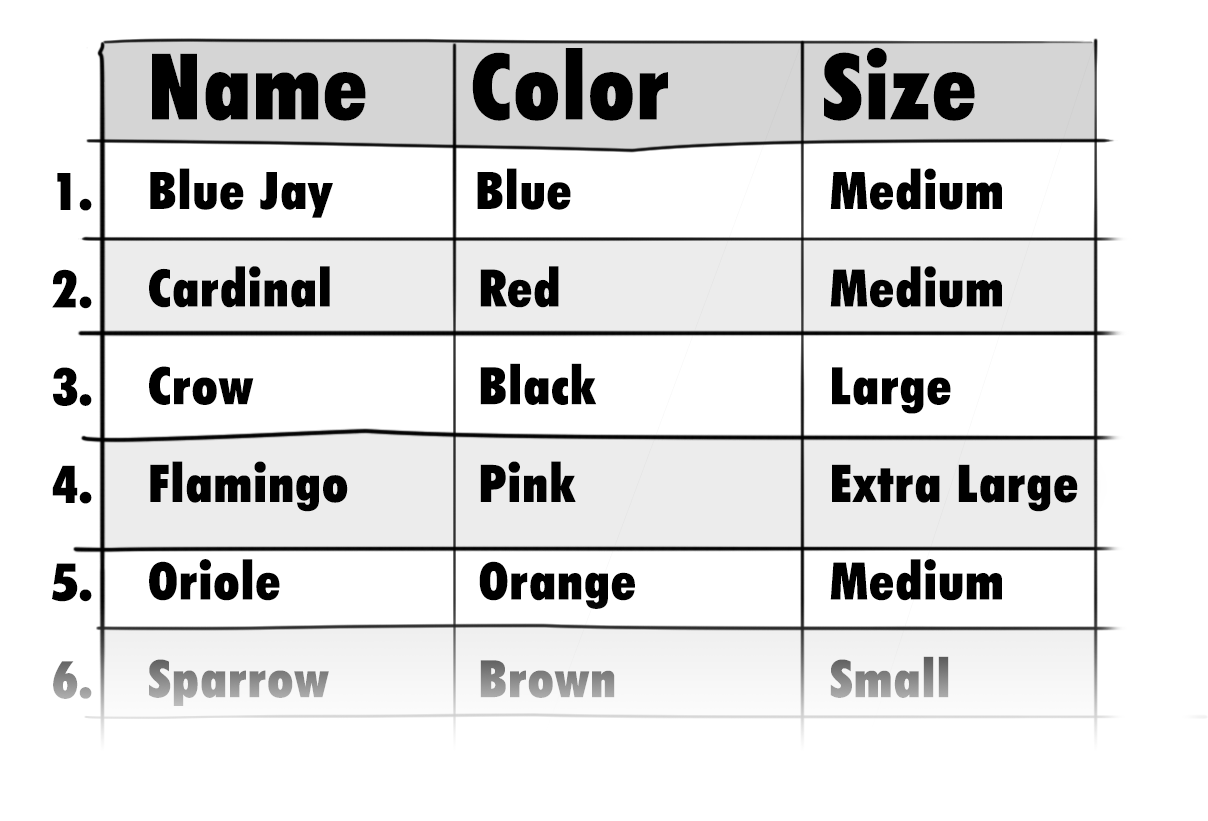
have a table of data indicating the colors and sizes of various birds, it may
look something like this:

Cardinality-table-of-details

If we were to count
the number of distinct values in each of our Color and Size columns, we would
find out we have 20 distinct colors, but only 5 distinct sizes:

SELECT 
    COUNT(DISTINCT Color) AS DistinctColors, 
    COUNT(DISTINCT Size) AS DistinctSizes
FROM 
    dbo.Birds

(to make things
easier for this example, the data in this table is perfectly evenly distributed
across all 20 colors and 5 sizes – meaning each color is represented by one of
each of the five sizes, making for a total of 100 rows)

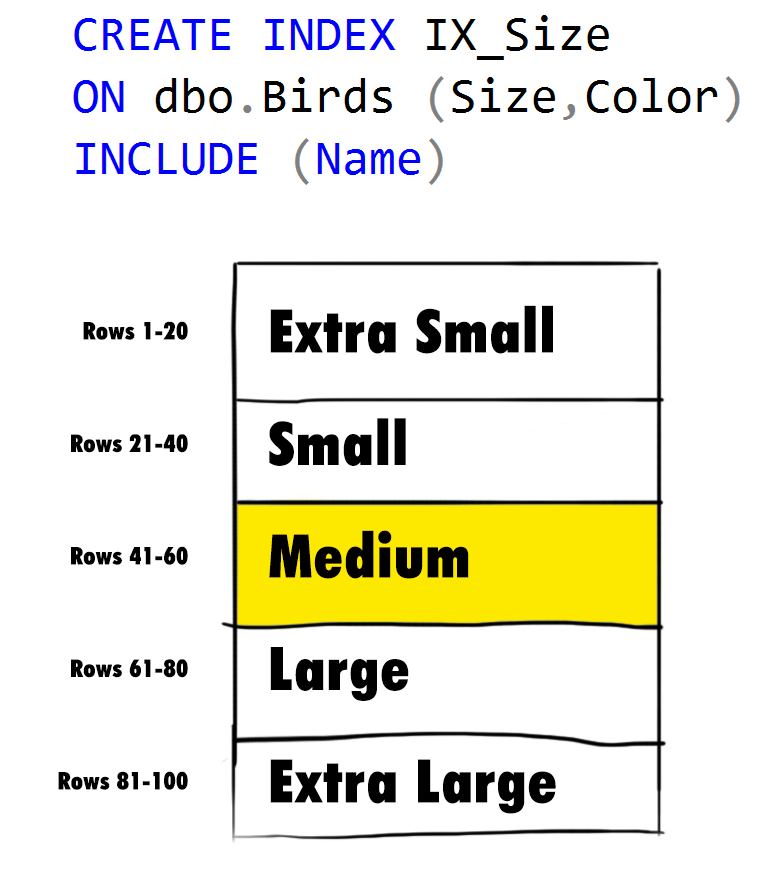
If we were to put Size as our leading index key column, SQL Server would immediately be able to narrow down the amount of rows it has to search to match our predicate (WHERE Color = 'Red' and Size = 'Medium') to 20 rows – after all, we can eliminate all rows where the sizes are not equal to Medium:

Order-by-Size-1

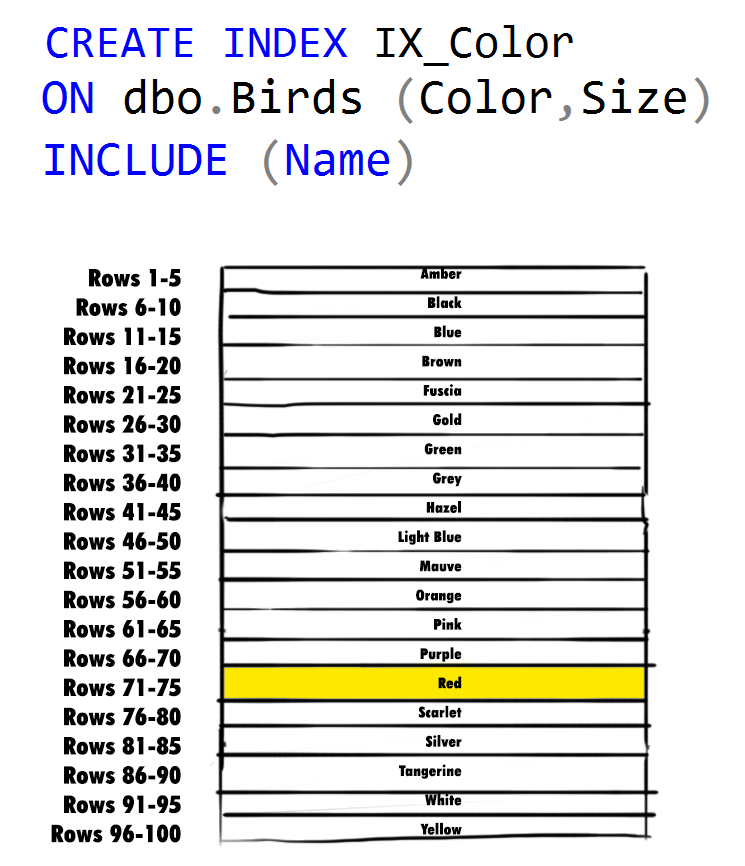
However, if we instead put Color as our first column, we can immediately eliminate 95% of the possibilities in our data set – only 5 rows with a value of 'Red' remain, one for each of our 5 distinct sizes (remember the data is perfectly distributed):

Order-by-Color-1

In most scenarios, putting the column with the highest cardinality first will allow SQL Server to filter out most of the data it knows it doesn't need, allowing it to focus on a smaller subset of data that it does still need to compare.

There are instances where you might want to deviate from this general rule though, like when you are trying to maximize an index's use by multiple queries; sometimes it might make sense to not put the columns in highest cardinality order if it means more queries are going to be able to make use of a single index.

Optimizing for Ad Hoc Workloads

Watch this week's video on YouTube

The execution plan cache is a great feature: after SQL Server goes through the effort of generating a query plan, SQL Servers saves that plan in the plan cache to be reused again at a later date.

One downside to SQL Server caching almost all plans by default is that some of those plans won't ever get reused. Those single use plans will exist in the plan cache, inefficiently tying up a piece of the server's memory.

Today I want to look at a feature that will keep these one-time use plans out of the plan cache.

Plan Stubs

Instead of filling the execution plan cache with plans that will never get reused, the optimize for ad hoc workloads option will cache a plan stub instead of the full plan. The plan stub is significantly smaller in size and is only replaced with the full execution plan when SQL Server recognizes that the same query has executed multiple times.

This reduces the amount of size one-time queries take up in t he cache, allowing more reusable plans to remain in the cache for longer periods of time.

Enabling this server-level feature is as easy as (a database scoped versions :

sp_configure 'show advanced options',1
GO
reconfigure
GO  
sp_configure 'optimize for ad hoc workloads',1
GO
reconfigure
go

Once enabled you can watch the plan stub take up less space in the cache:

-- Run each of these queries once
DECLARE @Username varchar = 'A'
SELECT UserName 
FROM IndexDemos.dbo.[User] 
WHERE UserName like @Username+'%';
GO

DECLARE @Username varchar = 'B'
SELECT UserName 
FROM IndexDemos.dbo.[User] 
WHERE UserName like @Username+'%';
GO

SELECT 
    cp.cacheobjtype,
    cp.objtype,
    cp.plan_handle,
    cp.size_in_bytes,
    qp.query_plan,
    st.text
FROM
    sys.dm_exec_cached_plans cp
    CROSS APPLY sys.dm_exec_query_plan(cp.plan_handle) qp
    INNER JOIN sys.dm_exec_query_stats qs
        ON cp.plan_handle = qs.plan_handle
    CROSS APPLY sys.dm_exec_sql_text(qs.sql_handle) st
WHERE 
    st.text like 'DECLARE @Username varchar =%';

424 bytes each, these plan stubs are tiny!

Now if we run our second query filtering on UserName LIKE 'B%' again and then check the plan cache, we'll notice the stub is replaced with an actual compiled plan:

image-2

The downside to plan stubs is that they add some cpu load  to our server: each query gets compiled twice before it gets reused from cache.  However, since plan stubs reduce the size of our plan cache, this allows more reusable queries to be cached for longer periods of time.

Great! All my cache problems will be solved

Not necessarily.

If your workload truly involves lots of ad hoc queries (like many analysts all working on different problems or dynamic SQL that's generating completely different statements on every execution), enabling Optimize for Ad hoc Workloads may be your best option (Kimberly Tripp also has a great alternative: clearing single use plans automatically on a schedule).

However, often times single-use query plans have a more nefarious origin: unparameterized queries. In this case, enabling Optimize for Ad hoc Workloads may not negatively impact your server, but it certainly won't help. Why? Because those original queries will still be getting generated.

Brent Ozar has a good overview of why this happens, but the short answer is to force parameterization on your queries. When you enable force parameterization, SQL Server will ~~not~~ automatically parameterize your queries if they aren't already, reducing the number of one off query plans in your cache.

Whether you are dealing with too many single use queries on your server or some other problem, just remember to find the root cause of the problem instead of just treating the symptoms.

SQL FAILS with Andy Mallon, Erin Stellato, and Mr. Anonymous!

Watch this week's video on YouTube

While most of us strive to make as few mistakes as possible when it comes to our servers and data, accidents do occasionally happen.

Sometimes those accidents are easily fixed while other times the solutions require herculean efforts (usually accompanied by lots of caffeine and cursing...or is that just me?).

This week I'm excited to have guests Andy Mallon (t), Erin Stellato (t), and Mr. ANONYMOUS (t) (don't spoil the fun by clicking these links until after watching!) share some of their most memorable SQL Server mishaps.

It's a video only post so be sure to watch above or on my YouTube channel (and be sure to watch until the end for a special...furry...cameo).

T-SQL Documentation Generator

MJ-t-sql-TuesdayThis post is a response to this month's T-SQL Tuesday #110 prompt by Garry Bargsley.  T-SQL Tuesday is a way for the SQL Server community to share ideas about different database and professional topics every month.

This month's topic asks to share how we automate certain processes.


Watch this week's video on YouTube

I'm a fan of keeping documentation close to the code. I prefer writing my documentation directly above a procedure, function, or view definition because that's where it will be most beneficial to myself and other developers.

Not to mention that's the only place where the documentation has any chance of staying up to date when changes to the code are made.

What drives me crazy though is making a copy of that documentation somewhere else, into a different format. You know, like when someone without database access needs you to send them a description of all of the procedures for a project. Or if you are writing end-user documentation for your functions and views.

Not only is creating a copy of the documentation tedious, but there is no chance that it will stay up to date with future code changes.

So today I want to share how I automate some of my documentation generation directly from my code.

C# XML Style Documentation in T-SQL

C# uses XML to document objects directly in the code:

/// <summary>
/// Retrieves the details for a user.
/// </summary>
/// <param name="id">The internal id of the user.</param>
/// <returns>A user object.</returns>
public User GetUserDetails(int id)
{
    User user = ...
    return user;
}

I like this format: the documentation is directly next to the code and it is structured as XML, making it easy to parse for other uses (eg. use a static document generator to create end-user documentation directly from these comments).

This format is easily transferable to T-SQL:

/*
<documentation>
  <author>Bert</author>
  <summary>Retrieves the details for a user.</summary>
  <param name="@UserId">The internal id of the user.</param>
  <returns>The username, user's full name, and join date</returns>
</documentation>
*/
CREATE PROCEDURE dbo.USP_SelectUserDetails
       @UserId int
AS
BEGIN
    SELECT Username, FullName, JoinDate FROM dbo.[User] WHERE Id = @UserId
END
GO


/*
<documentation>
  <author>Bert</author>
  <summary>Returns the value 'A'.</summary>
  <param name="@AnyNumber">Can be any number.  Will be ignored.</param>
  <param name="@AnotherNumber">A different number.  Will also be ignored.</param>
  <returns>The value 'A'.</returns>
</documentation>
*/
CREATE FUNCTION dbo.UDF_SelectA
(
    @AnyNumber int,
    @AnotherNumber int
)
RETURNS char(1)
AS
BEGIN
       RETURN 'A';
END
GO

Sure, this might not be as visually appealing as the traditional starred comment block, but I've wrestled with parsing enough free formatted text that I don't mind a little extra structure in my comments.

Querying the Documentation

Now that our T-SQL object documentation has some structure, it's pretty easy to query and extract those XML comments:

WITH DocumentationDefintions AS (
SELECT
    SCHEMA_NAME(o.schema_id) as schema_name,
    o.name as object_name,
    o.create_date,
    o.modify_date,
    CAST(SUBSTRING(m.definition,CHARINDEX('<documentation>',m.definition),CHARINDEX('</documentation>',m.definition)+LEN('</documentation>')-CHARINDEX('<documentation>',m.definition)) AS XML) AS Documentation,
    p.parameter_id as parameter_order,
    p.name as parameter_name,
    t.name as parameter_type,
    p.max_length,
    p.precision,
    p.scale,
    p.is_output
FROM
    sys.objects o
    INNER JOIN sys.sql_modules m
        ON o.object_id = m.object_id
    LEFT JOIN sys.parameters p
        ON o.object_id = p.object_id
    INNER JOIN sys.types t
        ON p.system_type_id = t.system_type_id
WHERE 
    o.type in ('P','FN','IF','TF')
)
SELECT
    d.schema_name,
    d.object_name,
    d.parameter_name,
    d.parameter_type,
    t.c.value('author[1]','varchar(100)') as Author,
    t.c.value('summary[1]','varchar(max)') as Summary,
    t.c.value('returns[1]','varchar(max)') as Returns,
    p.c.value('@name','varchar(100)') as DocumentedParamName,
    p.c.value('.','varchar(100)') as ParamDescription
FROM
    DocumentationDefintions d 
    OUTER APPLY d.Documentation.nodes('/documentation') as t(c) 
    OUTER APPLY d.Documentation.nodes('/documentation/param') as p(c)
WHERE
    p.c.value('@name','varchar(100)') IS NULL -- objects that don't have documentation
    OR p.c.value('@name','varchar(100)') = d.parameter_name -- joining our documented parms with the actual ones
ORDER BY
    d.schema_name,
    d.object_name,
    d.parameter_order

This query pulls the parameters of our procedures and functions from sys.parameters and joins them with what we documented in our XML documentation. This gives us some nicely formatted documentation as well as visibility into what objects haven't been documented yet:

image

Only the Beginning

At this point, our procedure and function documentation is easily accessible via query. We can use this to dump the information into an Excel file for a project manager, or schedule a job to generate some static HTML documentation directly from the source every night.

This can be extended even further depending on your needs, but at least this is an automated starting point for generating further documentation directly from the T-SQL source.